1第 1 步
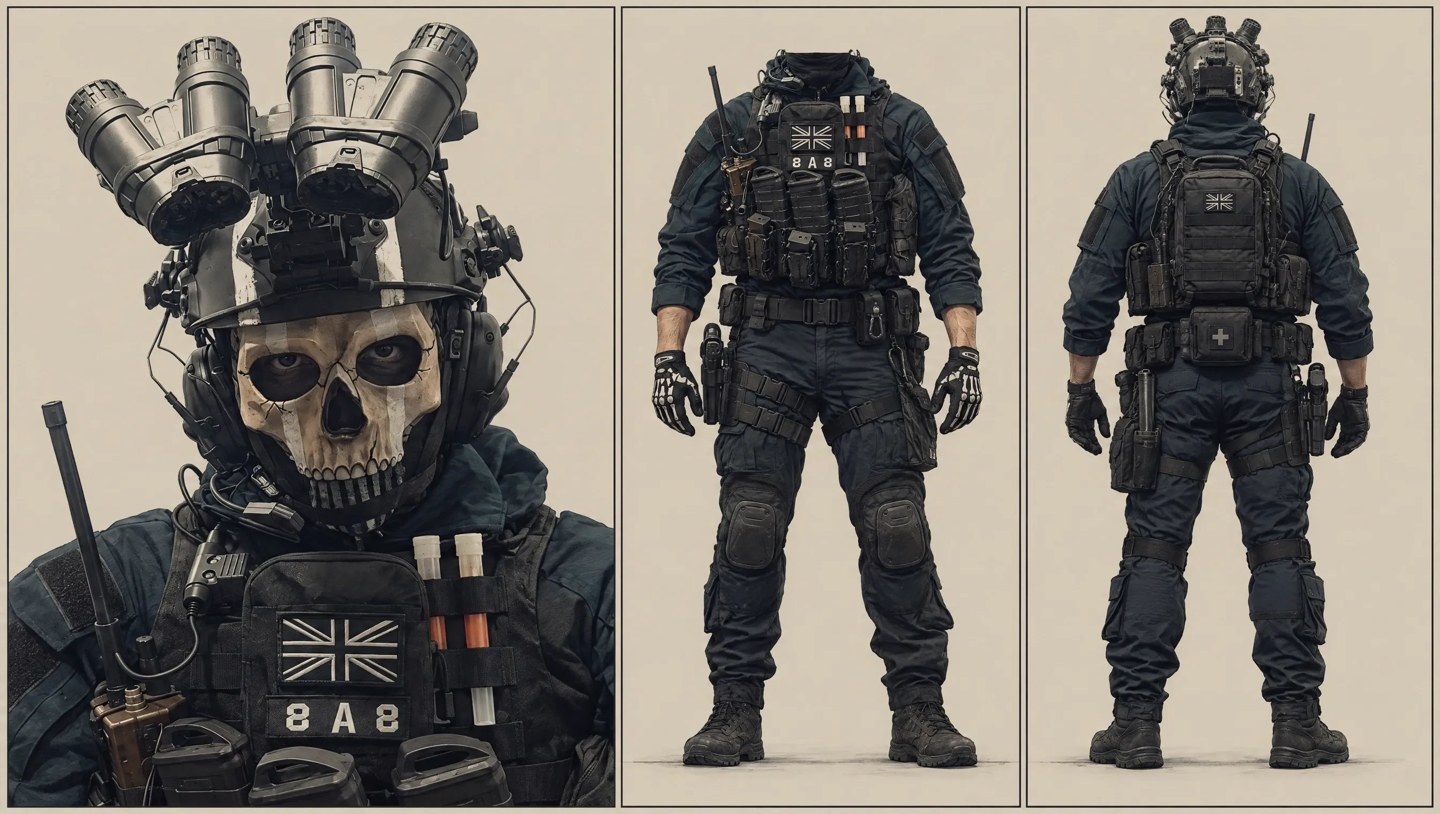
@character-a · 骷髅面罩特种兵
Pollo 页面给的角色设定图(头像 + 正面 + 背面),替换源视频左边的人
▸查看完整出图提示词(点击复制区)
复制
原帖未附提示词;Pollo 页面只放了这张角色设定图,没有给生成它的提示词。
 成片拆解
成片拆解Pollo 官方示例:上传一段两人唱歌的视频和两张角色图,把左右两位演员换成特种兵和外星人。
结构:橙色棚里两人并排近景唱歌 → 手势和转身 → 约 18.5s 切全景
看完成片再对照:这条片子靠什么在几秒内抓住人。点时间可跳到成片对应位置。
第 0 秒橙色背景近景:左边是戴骷髅面罩和头盔的特种兵,右边是灰绿色外星人,头顶吊着麦克风,外星人朝特种兵比手势。
约 4–16s 两人随音乐摆动、比手势,外星人一度转身背对镜头,特种兵抬手指点;动作和源视频里两位演员一一对应。
约 18.5s 切到全景,两人站在橙色棚里,头顶的麦克风吊杆露出来,继续随音乐动作到结尾。
提示词先写清楚谁是母版:源视频决定动作、机位、剪辑、背景和声音,两张图只管长相;再按「开场时站左边 / 右边」把角色 A、B 对应到原来的两个人,并要求交叉走位时按运动轨迹跟踪、不要换人。
别急着上视频模型。这个片子的秘密是:先把角色和场景锁死,再一次生成 5 个镜头。
这是 Pollo 官方博客的示例页,不是个人创作者帖。页面给了一段源视频(上方可播放,1280×720、24fps、约 29 秒,文件里没有音轨):两位真人演员在橙色摄影棚里对着吊麦唱歌,从人物造型看是电影《超级名模》(Zoolander)里 Ben Stiller 和 Owen Wilson 的片段(按造型判断,未核实具体出处)。另有两张角色设定图:骷髅面罩特种兵(角色 A,对应左边的人)和灰绿色外星人(角色 B,对应右边的人),页面没给生图提示词。
页面写的是参考视频生视频流程,可选 Seedance 2.5、Seedance 2.0、MiniMax H3 或 Wan 3.0,没写成片用的是哪个。成片 1280×720、30fps、约 29.7 秒,没看到水印;机位、剪辑、橙色背景和吊麦都跟源视频一致,只把两个人换了。成片带音轨,是一首英文说唱歌曲(语音识别低置信,未人工试听);页面提供的源视频文件没有声音,这首歌可能是原片段配的歌,未核实。页面提示词末尾自带一段版权说明:只有拥有源视频或获得授权时才能这样用。
上传源视频和两张角色图后选参考视频生视频,把下方英文提示词整段粘贴,@your-video 换成你的视频,@character-a / @character-b 换成你的两张图。结构依次是:总要求、源视频和参考图的分工、角色对应关系、保留原表演、镜头与剪辑、光线合成、声音、安全边界、结尾、负面提示词、版权说明和页面自带的 Final Summary。这版提示词是 Pollo 页面给的。
推荐用 GPT Image / 同等图模,比例 4:3。每张点开即可复制完整英文提示词。
Pollo 页面给的角色设定图(头像 + 正面 + 背面),替换源视频左边的人
原帖未附提示词;Pollo 页面只放了这张角色设定图,没有给生成它的提示词。
Pollo 页面给的角色设定图(头像 + 正面 + 背面),替换源视频右边的人
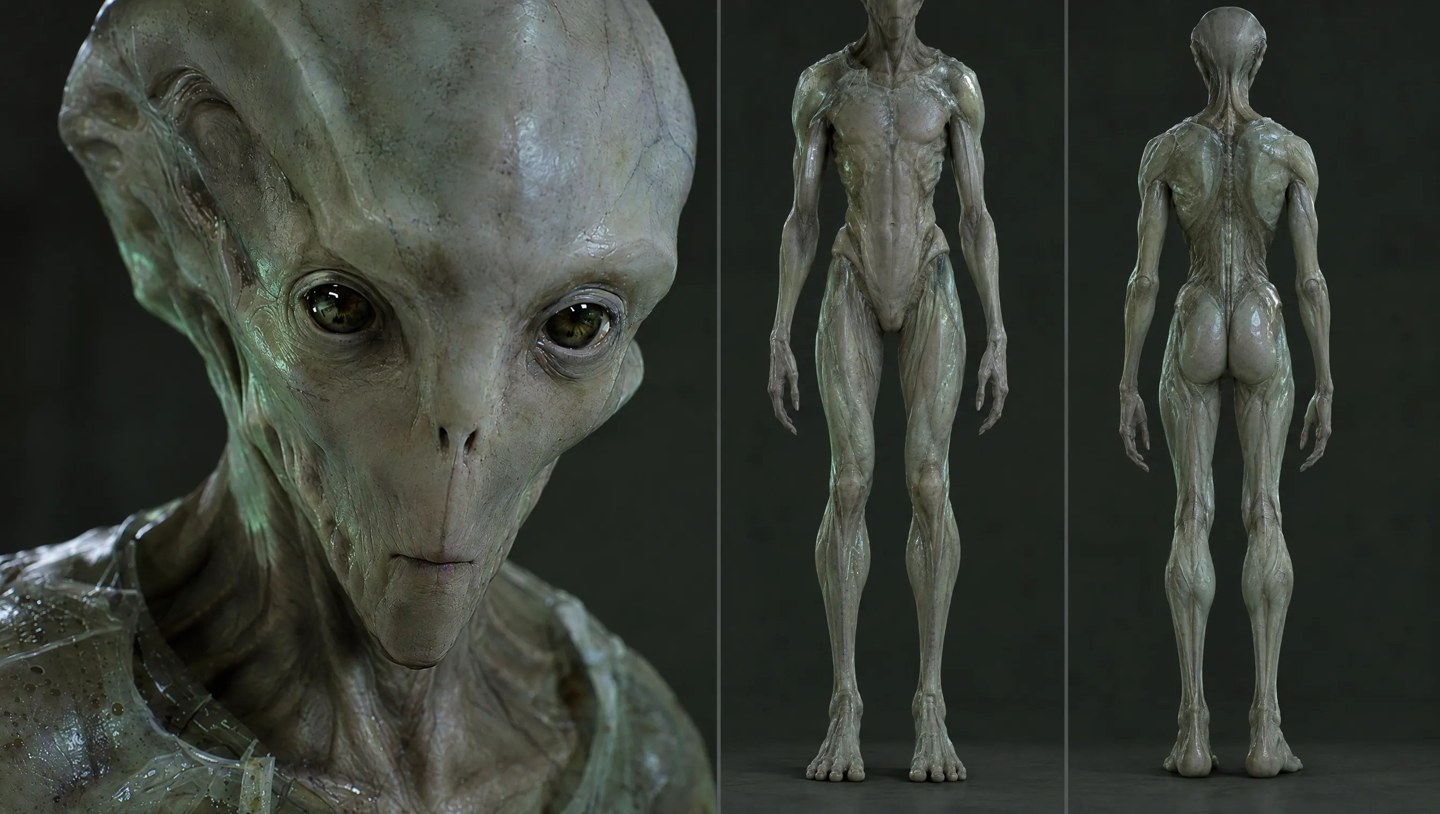
原帖未附提示词;Pollo 页面只放了这张角色设定图,没有给生成它的提示词。
方便你对照成片理解每一镜在干什么。
直接全选复制到 Seedance。@Image 1–2 必须对应上面 REF 编号。
Pollo 官方博客页英文完整视频提示词(含版权说明和 Final Summary)· 源视频 + 2 张角色图
PROMPT HEADER:
Edit the uploaded source video by replacing the two original performers with the two supplied original character references while preserving the source video as the only motion, performance, camera, editing, environment, and audio master.
SOURCE VIDEO AND REFERENCE ROLES:
Use @your-video as the sole editing master. Do not reinterpret, redesign, restage, extend, shorten, or replace the source performance. Use @character-a only as the global appearance reference for Character A, corresponding to the performer who starts on the left side of the original frame. Use @character-b only as the global appearance reference for Character B, corresponding to the performer who starts on the right side of the original frame.
The two PNG reference images are appearance references only. They are not first frames, last frames, keyframes, location references, lighting references, background plates, storyboard panels, or split-screen layouts. Do not show the reference images inside the edited video.
CHARACTER MAPPING AND IDENTITY:
Replace the original left performer with Character A from @character-a. Preserve Character A’s recognizable skull-style face covering, helmet, dark tactical clothing, equipment layout, colors, materials, and overall silhouette as shown in the reference image. Replace the original right performer with Character B from @character-b. Preserve Character B’s recognizable pale gray-green humanoid appearance, elongated head and body proportions, surface texture, eye design, colors, and overall silhouette as shown in the reference image.
Maintain exactly two performers throughout the full video. Keep Character A and Character B as separate identities with stable appearance, clothing or surface structure, masks or facial coverings, helmets or head shapes, colors, materials, proportions, and accessories. Do not exchange identities when they cross the frame. Track each character by the original performer’s motion path, body position, depth relationship, and temporal identity rather than by screen-left or screen-right position after the opening frame.
PERFORMANCE PRESERVATION:
Preserve the original singing performance from the source video. Match the original performers’ head orientation, torso movement, shoulder and chest rhythm, hand gestures, arm timing, stance, sway, and interaction timing. The replacement characters should appear to perform the same song through body language and the exact original audio timing, without inventing new choreography or extra gestures.
Because the characters’ mouths and noses are covered or otherwise not human-readable, do not generate exposed human faces, visible human lips, realistic mouth shapes, or lip movements that conflict with the references. Express singing through head direction, subtle nods, shoulder and chest breathing, body rhythm, hand gestures, posture, and the original performance timing. Keep the replacement motion synchronized to the existing singing audio without generating new dialogue or changing the vocal track.
CAMERA, EDITING, AND SPATIAL CONTINUITY:
Preserve every original camera cut, shot size, framing, lens perspective, camera movement, zoom, pan, tilt, tracking move, depth of field, focus transition, editing beat, and temporal rhythm. Maintain the original orange photography-studio background, the top-hanging microphones, the performers’ relative depth, their starting left and right positions, their height relationship, the distance between them, and all original stage-space relationships.
If the performers briefly cross, overlap, or exchange apparent screen positions, follow each original motion trajectory continuously. Do not swap Character A and Character B simply because one moves to the other side of the frame. Preserve foreground and background order, occlusion, entry and exit timing, and the exact screen-space relationship wherever the source video provides it.
LIGHTING, COMPOSITING, AND MATERIAL INTEGRATION:
Integrate the replacement characters naturally into the source footage. Match the original orange studio lighting, direction and softness of shadows, highlights, reflections, color temperature, exposure, contrast, perspective, depth of field, grain, compression, and motion blur. Keep character edges stable during movement and camera changes. Make the character materials respond consistently to the source lighting without introducing a new environment, a new color grade, or an unrelated cinematic style.
Preserve realistic contact with the original stage space. Keep feet, lower bodies, microphones, shadows, occlusions, and foreground-background relationships aligned with the source video. Do not let reference-image backgrounds, borders, panels, or studio layouts appear in the result.
AUDIO AND TIMELINE:
Keep the original singing audio exactly aligned to the source video’s timeline, rhythm, dynamics, pauses, and volume changes. Preserve the original music, singing, room sound, microphone presence, and timing only as they exist in the uploaded source. Do not add dialogue, narration, voice-over, subtitles, captions, sound effects, music, or a new vocal performance. Do not retime the audio to fit newly invented movement; fit the character replacement to the original audio and video timing.
SAFETY AND CONTENT BOUNDARIES:
This is a fictional stage singing performance. Do not depict combat, attack, weapon use, ammunition, explosions, wounds, blood, gore, threats, or real military operations. The performers’ hands may perform only the original stage gestures from the source video. Do not add weapons, dangerous props, political symbols, real military organizations, national flags, brand logos, film logos, title cards, subtitles, captions, or watermarks.
ENDING AND OUTPUT STATE:
End exactly when the source video ends, with the same final shot, final positions, final gestures, final lighting, final audio state, and final edit timing. The result must be a clean full-screen edited singing video containing exactly two original characters, with no visible reference-image panels, no split-screen character sheet, no extra people, and no generated text.
NEGATIVE PROMPT:
Changing the source choreography, new choreography, new gestures, new dialogue, narration, voice-over, new music, changed singing audio, changed audio timing, lip-sync animation, exposed human face, visible human lips, human mouth, wrong mask, wrong helmet, wrong head shape, identity swap, face swap between characters, character cloning, extra performer, missing performer, performer duplication, screen-left and screen-right identity exchange, incorrect crossing trajectory, broken occlusion, changed height ratio, changed distance, changed foreground-background order, changed microphone position, missing hanging microphone, new microphone, changed orange studio background, reference-image background, white reference sheet, dark alien environment, battlefield, weapons, ammunition, combat, attack, explosion, wounds, blood, gore, threat, realistic military operation, political symbols, national flags, brand logo, film logo, subtitles, captions, title cards, watermarks, split screen, triptych, character turnaround sheet, model sheet, storyboard panels, image borders, extra props, dangerous hand actions, deformed hands, extra limbs, unstable clothing, changing armor, changing mask, changing helmet, changing colors, material flicker, texture flicker, facial drift, anatomy drift, temporal flicker, frame interpolation artifacts, frozen body, stiff motion, broken tracking, floating feet, incorrect shadows, wrong perspective, mismatched depth of field, missing motion blur, excessive motion blur, low quality, blurry character replacement.
RIGHTS AND SOURCE-MATERIAL NOTE:
Use the source video and its music, singing, and imagery only when you own them or have permission to edit them. If the source contains third-party material and you do not have authorization, replace it with a self-owned or properly licensed singing video and audio before using this workflow.
Final Summary
Use the original singing video as the sole editing master and replace only the two performers. Character A from image 1 takes the original left performer’s identity track, while Character B from image 2 takes the original right performer’s identity track. Preserve the original singing performance, audio timeline, camera cuts, framing, orange studio background, hanging microphones, lighting, shadows, perspective, depth of field, motion blur, and spatial relationships.
The two reference images control appearance only. They must never become first frames, end frames, backgrounds, split-screen panels, or character sheets inside the output. Track each identity through crossings and camera changes using the original motion path, not the character’s temporary screen position. The finished result is a two-character fictional stage performance with no added dialogue, subtitles, weapons, violence, or unrelated visual elements.
当前是单页静态站:视频 + 指引 + 可复制提示词。后面可以做成多教程列表、账号、收藏提示词、一键复制、手机竖屏版等。