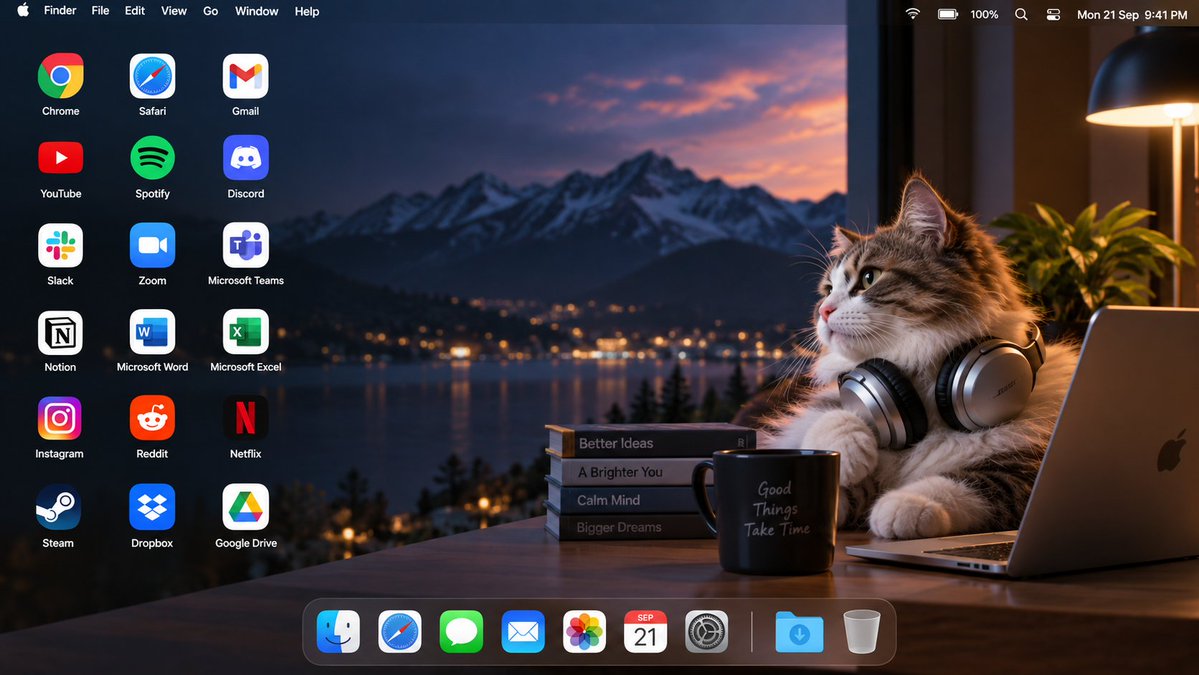
Platform / Model: MiniMax Hailuo H3 Max on ImagineArt
Aspect Ratio: 16:9
Source: https://x.com/Strength04_X/status/2101868703482876376
Reference image prompt reply: https://x.com/Strength04_X/status/2101868833103602102
Video prompt reply: https://x.com/Strength04_X/status/2101869064616542690
========== REFERENCE IMAGE PROMPT ==========
Create a premium 16:9 macOS desktop environment using the uploaded image as the visual reference for the main subject.

Extract the primary subject with clean, natural edges while preserving its exact identity, facial features, proportions, colors, outfit, hairstyle, accessories, rendering style, and overall personality. If the reference is anime, illustration, or photography, maintain the same medium and visual character. Remove all original background elements, borders, text, panels, and interface clutter. If multiple subjects are interacting, preserve their relationship and positioning.

DESKTOP COMPOSITION:
Build a cinematic widescreen desktop wallpaper with the subject positioned on the FAR RIGHT, taking roughly 42% of the frame. Keep the center open as visual breathing space. Reserve the LEFT 45% for desktop shortcuts. Maintain comfortable margins around the subject and ensure no face, hand, or important detail is hidden behind interface elements.

BACKGROUND DESIGN:
Generate an original macOS-inspired abstract environment based on colors found in the reference subject. Use layered translucent ribbons, soft glass-like shapes, subtle depth, flowing gradients, atmospheric lighting, and refined curved forms. Avoid generic blue macOS wallpaper styling. Match the background mood to the subject automatically:
cute = soft pastel atmosphere
futuristic = luminous gradients and subtle glow
dark = charcoal, deep violet, burgundy, or muted emerald
bright = clean warm gradients with controlled highlights
natural = earthy muted tones

Keep the LEFT area darker and visually simple so desktop labels remain readable. Add only subtle thematic shapes related to the subject.

DESKTOP SHORTCUTS:
Place exactly 18 application shortcuts in a precise 3-column × 6-row layout on the LEFT.

Row 1:
Chrome | Safari | Gmail

Row 2:
YouTube | Spotify | Discord

Row 3:
Slack | Zoom | Microsoft Teams

Row 4:
Notion | Microsoft Word | Microsoft Excel

Row 5:
Instagram | Reddit | Netflix

Row 6:
Steam | Dropbox | Google Drive

Use recognizable modern application logos, uniform visual scale, consistent spacing, and small clean white labels beneath every icon. No missing icons, duplicates, substitutions, or additional shortcuts.

TOP SYSTEM BAR:
Create a realistic slim translucent macOS menu bar spanning the entire width. On the left show:
Apple logo, Finder, File, Edit, View, Go, Window, Help

On the right show subtle Wi-Fi, battery, control/status symbols and a realistic clock. Keep the bar understated and integrated into the wallpaper.

BOTTOM DOCK:
Add a compact glass-style macOS Dock centered near the bottom, positioned slightly toward the LEFT if needed to prevent overlap with the subject.

Dock contents:
Finder, Safari, Messages, Mail, Photos, Calendar, System Settings, separator, Downloads, Trash

Use realistic macOS icon styling, subtle translucency, soft reflections, and restrained size.

VISUAL QUALITY:
Photorealistic desktop screenshot presentation, ultra-clean edges, accurate icon geometry, crisp typography, natural shadows, subtle glassmorphism, high dynamic range, refined lighting, balanced negative space, premium Apple-inspired design language.

The final image must look like a real personalized macOS desktop rather than a poster or mockup.

No computer hardware, monitor frame, keyboard, mouse, perspective view, open windows, browser tabs, banners, advertisements, large text, wallpapers containing duplicate characters, extra subjects, or additional desktop icons.

Output: one finished high-resolution 16:9 edge-to-edge desktop screenshot.
========== VIDEO PROMPT ==========
Create a 10-second horizontal 16:9 cinematic video using the provided macOS desktop screenshot as the EXACT first frame and visual reference.
IMPORTANT:
Preserve the reference image exactly as the starting frame. Do not redesign, replace, or regenerate the desktop environment. Maintain the same mountain lake background, warm sunset lighting, wooden desk, fluffy brown-and-white cat wearing large silver headphones, laptop, plant, books, coffee mug, macOS menu bar, 18 desktop application icons, and bottom Dock.
CHARACTER:
Keep the exact cat appearance, fur pattern, face, eyes, ears, headphones, body proportions, lighting, and position from the reference. The cat is sitting on the FAR RIGHT side of the desktop beside the laptop.
CAMERA:
Static front-facing camera.
No camera movement.
No zoom.
No pan.
No cuts.
One continuous shot.
Maintain exact 16:9 composition.
TIMELINE:
0–1.5s:
The cat remains completely calm in its original pose.
It sits beside the laptop with the headphones around its ears.
Its eyes slowly blink.
Its nose twitches slightly.
The ears make a tiny natural movement.
The desktop wallpaper, menu bar, all icons, Dock, laptop, books, mug and background remain completely stationary.
1.5–2.5s:
The cat suddenly sneezes.
Its head quickly moves forward and slightly toward the LEFT.
Its ears twitch and its headphones bounce naturally.
Its fur and whiskers react to the sneeze.
A small visible soft air puff travels from the cat toward the desktop icons.
The air puff accidentally knocks ONLY THREE desktop icons loose:
Gmail
Discord
Microsoft Teams
These three icons leave their original positions in the RIGHTMOST desktop-icon column.
They physically rotate and fall downward into the open desktop area above the Dock near the center-left.
Each icon moves separately.
Each icon lands with a small realistic bounce.
Their original positions become visibly empty.
ALL OTHER ICONS MUST REMAIN PERFECTLY STATIONARY.
2.5–3.3s:
The cat immediately freezes after sneezing.
Its eyes become slightly wider.
Its ears tilt backward.
It looks toward the fallen icons with a surprised and embarrassed expression.
The cat briefly looks toward the viewer as if pretending nothing happened.
Then it looks back at the fallen icons.
3.3–7.8s:
The cat hurriedly fixes the three fallen icons ONE AT A TIME.
FIRST — Gmail:
The cat reaches toward the fallen Gmail icon.
Its paw carefully touches and grips the icon.
It lifts Gmail from the desktop.
The cat carries Gmail toward its original empty position.
It places Gmail precisely back into its original location.
The Gmail logo and label remain unchanged.
A small gentle click is heard.
SECOND — Discord:
Only after Gmail has been restored, the cat reaches down toward the fallen Discord icon.
It picks Discord up individually.
It carries Discord back to its original empty position.
It releases Discord precisely into place.
A second gentle click is heard.
THIRD — Microsoft Teams:
Only after Discord has been restored, the cat reaches for Microsoft Teams.
It picks the Teams icon up individually.
It carries it back to its original position.
It carefully releases it into the empty grid position.
A third gentle click is heard.
IMPORTANT PHYSICAL ACTION RULES:
Every icon must visibly leave its original position, fall, land, be physically picked up, carried, and placed back.
Do NOT:
- restore icons automatically
- teleport icons
- make icons snap back from a distance
- move multiple icons simultaneously
- scoop multiple icons together
- stack icons
- duplicate icons
- morph logos
- change icon labels
The cat must interact with each icon separately.
The cat's paws must remain anatomically natural.
No extra paws.
No stretched limbs.
No distorted body.
No impossible reach.
7.8–10s:
After restoring Microsoft Teams, the cat quickly returns to its original position beside the laptop.
It sits upright again with the headphones correctly positioned.
The cat tries to look completely innocent.
It gently blinks.
Its ears settle.
Its whiskers and fur stop moving.
The cat briefly glances toward the restored icons, then looks forward again.
End with the cat sitting calmly in almost exactly the same pose as the first frame.
The final desktop must match the original reference composition.
VISUAL STYLE:
Photorealistic cinematic desktop environment.
Natural animal movement.
Realistic fur physics.
Subtle headphone movement.
Natural paw interaction.
Soft warm sunset lighting.
Realistic shadows.
Realistic depth of field.
Premium Apple-style desktop presentation.
PRESERVE:
- exact macOS menu bar
- exact desktop wallpaper
- exact 18 application icons
- exact icon positions
- exact labels
- exact Dock
- laptop
- books
- mug
- plant
- cat
- headphones
- lighting
- colors
- composition
ONLY Gmail, Discord and Microsoft Teams are allowed to move.
AUDIO:
Light playful piano and subtle pizzicato music.
One cute realistic cat sneeze.
Short airy whoosh during the sneeze.
Three soft icon landing sounds.
Three distinct gentle clicks when Gmail, Discord and Microsoft Teams are restored.
Brief music pause during the cat's shocked reaction.
No dialogue.
No subtitles.
No text overlays.
FINAL FRAME:
All three icons must be restored to their exact original positions.
No missing icons.
No duplicated icons.
No changed logos.
No extra objects.
The cat returns to its original pose and looks innocent.
The final frame should closely match the first frame.
 成片拆解
成片拆解