Platform / Model: MiniMax H3 on Flova (#flovaCPP)
Aspect Ratio: 16:9
Source: https://x.com/Strength04_X/status/2101913634293297466
Reference image prompt reply: https://x.com/Strength04_X/status/2101913745794740629
Video prompt reply: https://x.com/Strength04_X/status/2101913903802499214
========== REFERENCE IMAGE PROMPT ==========
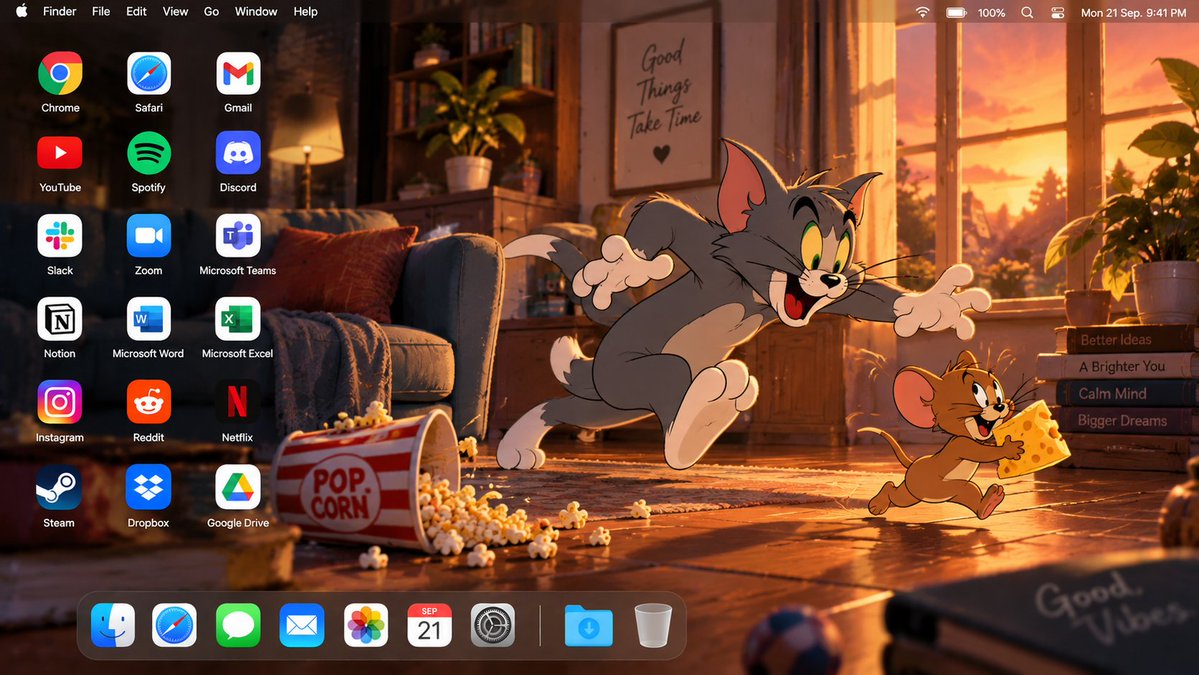
Create a high-end 16:9 macOS desktop screenshot featuring Tom and Jerry as the main characters.

Build an original cinematic cartoon living-room environment at sunset, with warm window light entering from one side, wooden flooring, cozy furniture, soft shadows, scattered playful objects, and subtle atmospheric depth.

Place Tom and Jerry together on the RIGHT side in an expressive playful moment, preserving their recognizable classic cartoon appearance, proportions, colors, facial expressions, clothing/details, and original 2D animation aesthetic.

Tom should be reacting dramatically while Jerry appears mischievous, creating a natural storytelling moment. Keep both characters fully visible and avoid cropping faces, hands, tails, or important details.

Use warm golden-orange lighting mixed with deep brown, cream, muted red, and soft blue accents. Add subtle cinematic lighting and depth while keeping the artwork clearly cartoon-styled.

Reserve the LEFT side for desktop shortcuts. Add exactly 18 applications in three columns and six rows:

Chrome | Safari | Gmail
YouTube | Spotify | Discord
Slack | Zoom | Microsoft Teams
Notion | Word | Excel
Instagram | Reddit | Netflix
Steam | Dropbox | Google Drive

Use clean recognizable application logos, identical sizing, generous spacing, and crisp white labels.

Add a realistic translucent macOS menu bar across the top:
Apple logo, Finder, File, Edit, View, Go, Window, Help
with Wi-Fi, battery, control icons, and clock on the right.

Add a floating translucent Dock along the bottom, positioned toward the LEFT so Tom and Jerry remain unobstructed.

Dock:
Finder, Safari, Messages, Mail, Photos, Calendar, System Settings, separator, Downloads, Trash.

Final style: premium animated-film artwork combined with a realistic macOS interface, cinematic composition, clean typography, strong character integration, polished lighting, detailed environment, and balanced negative space.

No laptop, monitor, keyboard, mouse, open applications, extra characters, duplicate icons, large titles, advertisements, banners, or watermark.

Output one finished high-resolution 16:9 edge-to-edge desktop image.
========== VIDEO PROMPT ==========
Create a 10-second horizontal 16:9 cinematic video using the provided Tom and Jerry macOS desktop image as the EXACT first frame and visual reference.
IMPORTANT:
Preserve the reference desktop exactly as shown, including the warm sunset living room, wooden floor, sofa, window, books, popcorn box, scattered popcorn, macOS menu bar, left-side application grid, bottom Dock, and all desktop elements.
Keep Tom and Jerry's exact recognizable classic cartoon appearance, proportions, colors, facial features, expressions, poses, and original 2D animation style. Do not redesign, modernize, photorealize, or change their visual style.
Begin with Tom running dramatically toward Jerry on the RIGHT side while Jerry runs away carrying a piece of cheese.
CAMERA:
Static front-facing camera.
One continuous shot.
No camera movement.
No zoom.
No pan.
No cuts.
TIMELINE:
0–1.5s:
Tom continues chasing Jerry across the living-room floor.
Tom looks determined and slightly frustrated.
Jerry runs quickly toward the RIGHT while holding the cheese.
Jerry looks back at Tom with a mischievous smile.
Tom's arms, legs, ears, tail, and facial expression move naturally with exaggerated classic cartoon animation.
1.5–2.5s:
Jerry suddenly changes direction and runs toward the LEFT.
Tom reacts dramatically and tries to stop himself.
Tom's feet slide across the wooden floor and he accidentally kicks the scattered popcorn forward.
A sudden exaggerated cartoon air movement travels toward the LEFT side of the desktop.
The air movement accidentally knocks THREE desktop icons loose:
Gmail
Discord
Microsoft Teams
The three icons physically leave their original positions in the RIGHTMOST desktop-icon column.
They rotate separately through the air and fall into the open desktop area above the Dock near the center-left.
Each icon lands separately with a small bounce.
Their original grid positions are now visibly empty.
2.5–3.2s:
Tom freezes after realizing what happened.
His eyes widen.
Jerry also stops for a moment and looks at the fallen icons.
Tom slowly looks toward the viewer with an embarrassed expression.
Jerry looks at Tom mischievously as if amused by the situation.
Tom immediately decides to fix the problem.
3.2–7.8s:
Tom restores the three fallen icons ONE AT A TIME.
FIRST — Gmail:
Tom carefully reaches toward the fallen Gmail icon.
He picks up Gmail individually with one paw.
The icon must visibly leave the desktop surface.
Tom carries Gmail across the desktop toward its original empty position.
He carefully places Gmail back into its exact original location.
The Gmail logo and label remain unchanged.
A soft click is heard.
Only after Gmail is completely restored does Tom reach for the next icon.
SECOND — Discord:
Tom reaches down and individually picks up the fallen Discord icon.
He carries Discord toward its original empty position.
He carefully presses it back into the correct grid position.
A second gentle click is heard.
Jerry watches Tom while standing nearby with the cheese.
THIRD — Microsoft Teams:
Tom reaches down once more.
He picks up Microsoft Teams individually.
He carries it back to its original position.
He carefully releases it into the empty grid position.
A third gentle click is heard.
Show all three separate pickup-and-replace actions clearly.
IMPORTANT PHYSICAL ACTION RULES:
Every moving icon must visibly:
leave its original position
fall through the air
land on the desktop
be physically picked up
be carried by Tom
be placed back into its original position
Do NOT:
- restore icons automatically
- teleport icons
- make icons snap back from a distance
- move multiple icons simultaneously
- scoop multiple icons together
- stack icons
- duplicate icons
- morph logos
- change labels
Tom must restore Gmail, Discord, and Microsoft Teams separately.
His paws must remain anatomically consistent with the original cartoon style.
No extra paws.
No extra fingers.
No stretched limbs.
No distorted characters.
Jerry remains nearby and reacts naturally while Tom fixes the desktop.
7.8–10s:
After placing Microsoft Teams back into position, Tom quickly returns to the RIGHT side.
Jerry runs a short distance away while still holding the cheese.
Tom straightens himself and tries to regain his dignity.
He looks toward the restored icons.
Then he looks directly at the viewer with an innocent, slightly embarrassed expression.
Jerry briefly looks back at Tom with a mischievous smile.
Tom pretends nothing happened.
Hold the final pose for the remaining moment.
The final desktop must closely match the original first frame.
DESKTOP PRESERVATION:
Only Gmail, Discord, and Microsoft Teams are allowed to move.
Everything else must remain completely stationary:
Chrome
Safari
YouTube
Spotify
Slack
Zoom
Notion
Microsoft Word
Microsoft Excel
Instagram
Reddit
Netflix
Steam
Dropbox
Google Drive
The macOS menu bar must remain stationary.
The Dock must remain stationary.
The wallpaper and all furniture must remain stationary.
Do not change application logos or labels.
Do not duplicate any icons.
AUDIO:
Light playful cartoon piano and pizzicato music.
Fast playful rhythm during Tom's chase.
A short cartoon sliding sound when Tom loses balance.
A brief airy whoosh as the three icons are knocked loose.
Three soft landing sounds as the icons fall.
Three distinct gentle clicks as Tom restores Gmail, Discord, and Microsoft Teams.
Music briefly pauses during Tom's shocked reaction, then resumes with a playful rhythm.
No dialogue.
No subtitles.
No text overlays.
VISUAL QUALITY:
Premium cinematic cartoon animation integrated into the existing macOS desktop.
Keep Tom and Jerry clearly 2D while maintaining the cinematic lighting of the environment.
Natural squash-and-stretch animation.
Smooth character motion.
Clean cartoon outlines.
Consistent colors.
Natural shadows.
Subtle floor reflections.
Realistic interaction with the environment.
FINAL FRAME:
All three icons must be restored to their exact original positions.
Tom and Jerry remain on the RIGHT side.
Tom looks embarrassed but tries to appear innocent.
Jerry remains mischievous.
No missing icons.
No duplicate icons.
No changed logos.
No extra characters.
No extra objects.
No camera movement.
No cuts.
The final frame should closely match the original reference image.
 成片拆解
成片拆解